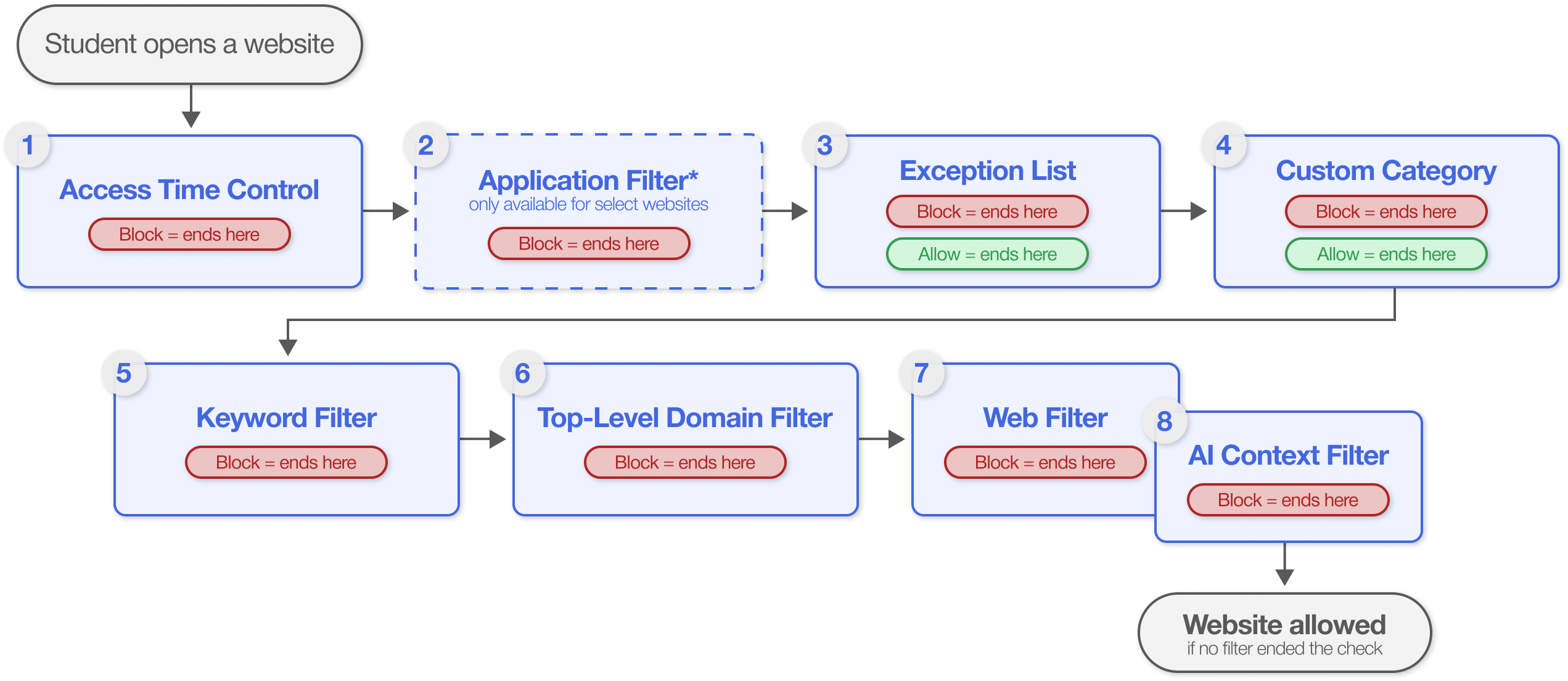
Filters
Filters define the individual rules that control what students can reach on the web. Each filter handles one type of content, such as website categories, specific URLs, keywords, or YouTube channels.
Note
A filter has no effect on its own. It applies only after you add it to a policy and assign that policy to an organizational unit.
To access the Filters page, click Content Filtering from the Main Menu, then click Filters from its sub-menu. The page opens on the Web Filter tab.
Filters are organized into three groups:
Group | Filter | Controls |
|---|---|---|
Web Filters | Websites by category | |
Your own groups of websites | ||
Specific websites and URLs | ||
Websites by domain ending, such as | ||
When students can browse, use social media, or watch YouTube | ||
Google applications and Windows application traffic | ||
Context Filters | Pages by the words they contain | |
Pages by their analyzed content | ||
YouTube Filters | Videos by category | |
Entire YouTube channels | ||
Videos by the words in their title and description |
Filtering Hierarchy